Output Pipeline
Transform, copy, and paste the final text.
Each shortcut has one output pipeline: transcript, optional script transform, final text, optional clipboard copy, and optional paste shortcut. The clipboard is the transport for paste actions.
Pipeline
recorded audio
  -> local Whisper transcription
  -> optional script transform
  -> final text
  -> optional clipboard copy
  -> optional paste shortcut
If script output is enabled, stdout from the script becomes the final text. QuillSpeak does not copy the original transcript as a fallback after a script error; failed script output is treated as an output failure.
Scripts
A script transform is any executable file. QuillSpeak passes the transcript as the first command-line argument. Standard input is closed. The script should write the replacement text to stdout.
| Contract | Behavior |
|---|---|
| Input | $1 is the transcript text. Stdin is not used. |
| Output | Stdout becomes final text. |
| Errors | Non-zero exit, spawn failure, or empty invalid output is logged as an output failure. |
| Path | The settings UI expects an absolute executable path. |
Minimal script:
#!/usr/bin/env bash
set -euo pipefail

text="${1:-}"
printf '%s\n' "$text"
chmod +x ~/bin/quillspeak-echo.shTranslator Example
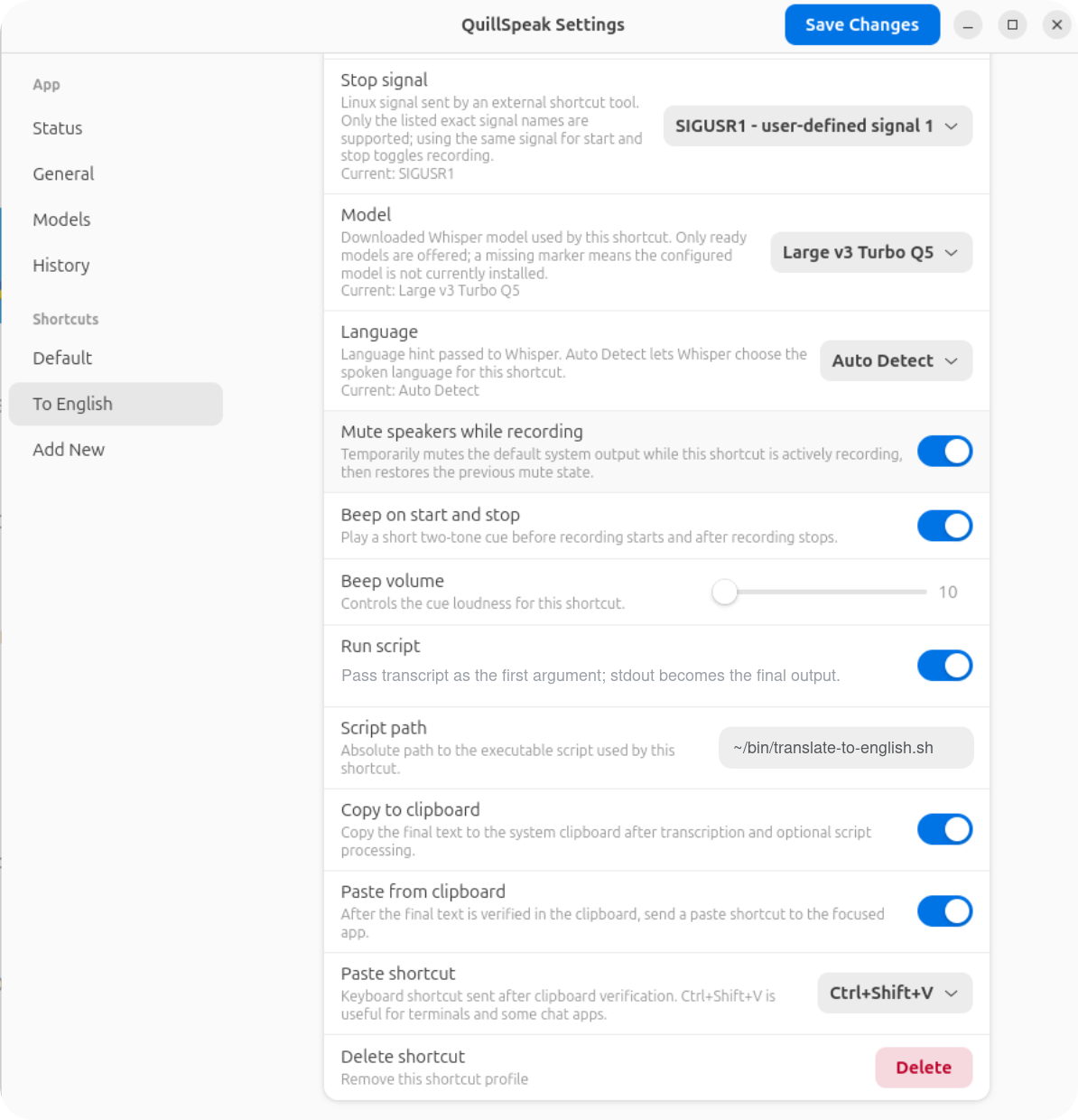
A translation shortcut is just a shortcut with Run script
enabled. For example, a "To English" profile can transcribe in
auto language mode, run a translator script, then copy and paste
the translated result with Ctrl+Shift+V.
This repository includes a public example script at
docs/examples/translate-to-english.sh.
It defaults to Claude Code print mode when claude is
installed, and otherwise prints the original text so the shortcut
still has predictable behavior.
The example runs Claude Code in a script-friendly cloud mode with
--bare, --safe-mode,
--strict-mcp-config, and
--disallowedTools "mcp__*" so user customizations and
MCP servers are not loaded for each translation.
mkdir -p ~/bin
curl -fsSL https://ilysenko.github.io/quillspeak/examples/translate-to-english.sh \
  -o ~/bin/translate-to-english.sh
chmod +x ~/bin/translate-to-english.sh
Useful environment knobs for that example:
| Variable | Default | Use |
|---|---|---|
QUILLSPEAK_TRANSLATOR_BACKEND |
claude |
Use claude or haiku for fast cloud translation, sonnet for a stronger Claude model, or plain to echo input. |
QUILLSPEAK_CLAUDE_MODEL |
haiku |
Fast Claude Code model alias for short translation/rewrite tasks. |
QUILLSPEAK_CLAUDE_FALLBACK |
sonnet |
Fallback model alias if the primary model is overloaded or unavailable. |
QUILLSPEAK_CLAUDE_EFFORT |
low |
Keeps Claude Code latency low for short push-to-talk translations. |
Local transcription, optional cloud script
QuillSpeak's audio transcription remains local. A script can choose to call a cloud service after transcription. That is the script's behavior, not hidden app behavior.
Clipboard Tools
Copy-to-clipboard writes the final text to the system clipboard and verifies success by reading it back through the external clipboard tool for the current display backend.
| Backend | Copy command | Readback command |
|---|---|---|
| Wayland | wl-copy --type text/plain;charset=utf-8 -- |
wl-paste --no-newline --type text/plain;charset=utf-8 |
| X11 | xclip -selection clipboard -in |
xclip -selection clipboard -out |
Copy-to-clipboard leaves the final text in the clipboard. It does not restore the previous clipboard value.
Paste Shortcuts
Paste-from-clipboard runs only after clipboard verification. It sends a keyboard shortcut to the focused app; QuillSpeak does not directly inject text into another application.
| Backend | Command | Default custom sequence |
|---|---|---|
| X11 | xdotool key --clearmodifiers ... |
ctrl+v |
| Wayland | ydotool key ... |
29:1 47:1 47:0 29:0 |
Ctrl+Shift+V is useful for terminals and some chat
applications. Custom ydotool sequences use raw
keycode:pressed events, where pressed is
1 for key down and 0 for key up.
Shortcut Examples
| Shortcut | Suggested settings |
|---|---|
| Default dictation |
Auto language, a ready local model, copy enabled, paste
enabled with Ctrl+V.
|
| To English |
Auto language, script path
~/bin/translate-to-english.sh, copy enabled,
paste enabled with Ctrl+Shift+V.
|
| Terminal command |
English language, copy enabled, paste enabled with
Ctrl+Shift+V, beep enabled so you know when the
capture starts and stops.
|
| History only | Copy disabled and paste disabled. The final text is still recorded in local history. |